How to Check Your MOI Qatar ID Status Online: A Complete Guide

If you’re moving to Qatar or are already a resident, securing your Qatar ID (QID) is crucial. This national identification card serves as proof of identity, allowing access to various government services, employment, banking, and residency benefits. Keeping track of your QID status ensures you avoid any inconveniences due to an expired or delayed card.
In this guide, we’ll walk you through the process of performing an MOI Qatar ID status check online using the Ministry of Interior (MOI) portal.
What is a Qatar ID (QID)?
A Qatar ID (QID) is an official identification document issued to both citizens and expatriates in Qatar. It contains essential personal details such as:
- Full Name
- Photograph
- Date of Birth
- Gender
- Nationality
- Unique 11-digit QID Number
This ID is a legal requirement and must be renewed before expiration to avoid fines or service interruptions.
How to Check MOI Qatar ID Residence Permit Status Online
You can track the status of your Qatar ID residence permit through the MOI portal in just a few steps:
How to Check Qatar ID Status Online
- Visit the official MOI website at portal.moi.gov.qa.
- Navigate to the "Inquiries" section under "MOI Services."
- Click on "Other Inquiries" within the "Inquiries" section.
- On the "Other Services" page, select "Official Documents."
- Enter your Qatar ID number (QID) in the provided field.
- Complete the CAPTCHA by entering the code displayed on the website.
- Click the "Search" button to check your Qatar ID status.
Once submitted, the system will display:
QID Expiry Date
Residency Permit Status
Passport Expiry Information
Driver’s License Details (if applicable)
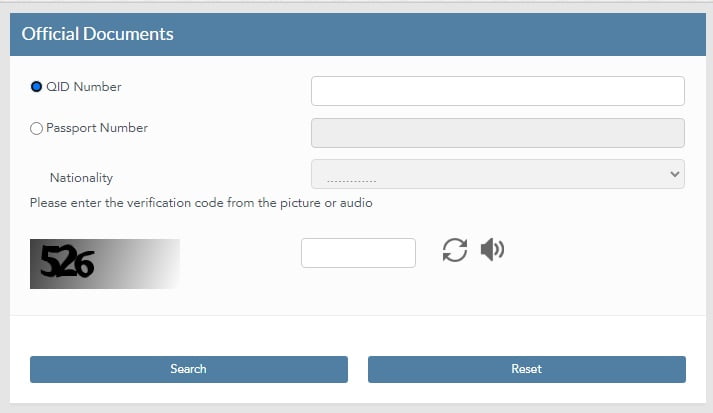
This guide provides clear instructions on how to verify the status of your Qatar ID online through the official website of the Ministry of Interior.
Once you click on the 'Submit' button, the system will display your ID Card Expiry and Residency Expire status.
It's important to keep track of these dates to ensure your documents are always up-to-date.
Method 2: Checking via Metrash2 App
For added convenience, you can check your Qatar ID status through the Metrash2 mobile app, which is available for both Android and iOS.
- Download & install the Metrash2 app from the App Store or Google Play.
- Log in using your QID number and registered mobile number.
- Go to the Wallet section within the app.
- Select Qatar ID Status to view real-time updates.
Benefits of a Smart QID Card (Your Qatar ID Status Regularly)
A Smart QID Card is a technologically advanced version of the traditional Qatar ID. It offers several benefits, including:
- Licensing permits
- Document renewals
- Reissuance of a driving license
- Permit payments
- Online government transactions
Regularly verifying your QID status ensures that you:
✔ Avoid legal penalties due to an expired ID.
✔ Ensure uninterrupted access to government and banking services.
✔ Stay informed about upcoming renewal deadlines.
✔ Prevent travel disruptions due to passport or residency expiration.Smart Qatar ID (Smart QID) and Its Advantages
The Smart QID is an upgraded version of the traditional Qatar ID, offering additional benefits such as:
- Licensing & Permit Renewals
- E-Government Transactions
- Online Payment Services
- Reissuance of Lost/Damaged Cards
Applying for a Smart QID can save time and provide enhanced digital access to essential services.
Common Issues & Troubleshooting
If you encounter any issues while checking your QID status, consider the following solutions:
- Incorrect QID Number: Double-check your 11-digit ID number before submitting.
- System Errors: If the website is down, try checking again later or use the Metrash2 app.
- Pending Processing: If your status shows as “under process,” wait a few days and check again.
- Expired ID: Visit the nearest MOI service center to renew your ID.
For further assistance, contact the MOI Qatar helpline at +974 2366666.
Frequently Asked Questions (FAQs)
1. How long does it take to process a Qatar ID?
- Typically, it takes 2-4 working days, depending on fingerprint and medical test approvals.
2. What is the cost of obtaining or renewing a Qatar ID?
- New or renewal fee: QR 100
- Replacement for lost/damaged ID: QR 200
3. Where can I complete the fingerprinting process?
- At the MOI Fingerprinting Center, located on Salwa Road, near the industrial area flyover.
Conclusion
Tracking your MOI Qatar ID status online is a simple yet essential process for all residents and citizens. By following the steps outlined in this guide, you can ensure your documents remain up-to-date and avoid any inconvenience related to expired identification.
Stay informed, stay compliant, and enjoy a hassle-free experience living in Qatar!
For more details, visit the Qatar MOI official website or download the Metrash2 app today.